
Screenshots
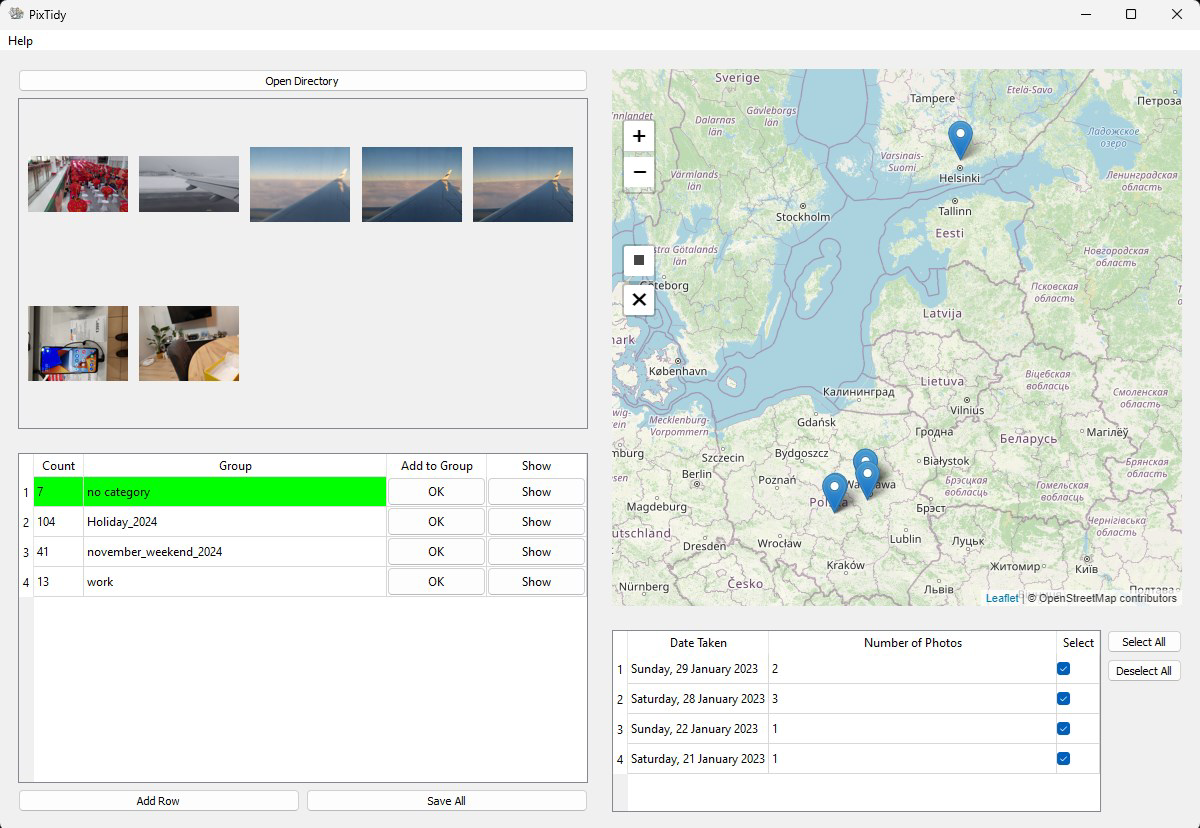
App details
- Updated
- 2024-11-05T05:32:32.8384753Z
- Requires
- Windows 10 version 17763.0 or higher
- Language
- English
- Developer
- Damian Urbański
- Category
- Mobile
SoftPas in:
This product is also available in the following languages:
About PixTidy
Download PixTidy – Organize Photos by Time & Place
Overview
PixTidy is a mobile application designed to help users regain control over their digital photo collections, which often become disorganized over time. The app addresses the common challenge of managing large volumes of photos and videos that are scattered across multiple folders or stored in a single, cluttered library. By offering structured categorization based on time and location, PixTidy enables users to transform chaotic photo libraries into well-ordered archives. This functionality is particularly beneficial for individuals who frequently capture memories through photography—such as travelers, families, and hobbyists—seeking a faster, more intuitive way to access and preserve their visual history.
The app is tailored for users who value both efficiency and privacy, especially those concerned about the long-term accessibility and security of their personal media. It supports real-world use cases such as organizing vacation photos, sorting event images, or archiving home improvement projects. By grouping files by date and geographic location, PixTidy enhances the retrieval process, allowing users to revisit memories with minimal effort. The developer did not provide additional technical details about the company or background, but the app’s focus on local data processing indicates a commitment to user privacy. In the broader mobile app ecosystem, PixTidy fills a niche for lightweight, privacy-first tools that empower users to manage their digital content without relying on cloud services.
Key Features & Functionality
- Organize by Time & Place: PixTidy automatically groups photos and videos based on their metadata, creating folders such as “Vacation 2022” or “House Construction Photos.” This feature simplifies long-term archiving and makes it easier to locate specific memories later.
- Free Up Disk Space: The app includes tools to identify duplicate, low-quality, or unnecessary files, enabling users to delete them safely. This helps optimize storage, especially on devices with limited capacity.
- User-Friendly Interface: With a clean, intuitive layout, PixTidy allows users to browse photos via a map view, filter by date ranges, and navigate directories effortlessly. Even users with minimal technical experience can manage their libraries effectively.
- Local Operations for Privacy: All processing and file management occur directly on the user’s device. No data is uploaded to external servers, ensuring that personal photos remain private and secure.
- Quick Save and Sort: Users can apply changes in bulk using the “Save All” function, moving or copying files to designated folders with just a few taps. This drastically reduces the time required for manual file management.
For example, a family planning to archive photos from a recent trip can use PixTidy to automatically sort images by travel dates and destinations, then save the entire collection into a single, labeled folder. Similarly, a photographer managing hundreds of raw files can use the app to identify and remove duplicates or low-resolution images, freeing up valuable space.
Interface, UX & Performance
PixTidy features a clean, minimalist interface that prioritizes usability and visual clarity. The layout is designed around a central navigation flow, allowing users to access folders, view photos on a map, and apply filters with minimal taps. The app’s visual style emphasizes readability and accessibility, with clear icons, consistent spacing, and intuitive color cues. Navigation is straightforward, with a bottom menu bar providing quick access to core functions such as browsing, filtering, and saving changes.
Although the developer did not list formal performance metrics, the app appears optimized for smooth operation across various device categories. Users can expect responsive interactions when browsing large photo libraries or applying bulk actions. The interface maintains stability during extended use, with no reported crashes or freezes in the available information. The app handles file operations efficiently, with minimal lag when sorting or moving multiple files. The local processing model contributes to consistent performance, as it avoids dependency on internet speed or server response times. Overall, the user experience is streamlined and focused on task completion without unnecessary distractions.
Platform Compatibility & Technical Requirements
PixTidy is available on Android, with a release date of 2024-11-05. The app’s file size is not specified, but it is designed to operate efficiently on modern smartphones. The developer did not specify minimum OS requirements or version compatibility. Similarly, no information was provided regarding supported hardware specifications or device types. Compatibility information was not fully disclosed, so users are advised to check their device’s capabilities before installation. The app does not appear to require root access or special permissions beyond standard storage access, though this was not confirmed.
Pros and Cons
Pros
- Organizes photos by date and location for better memory retrieval
- Supports local data processing, ensuring user privacy
- Intuitive interface suitable for non-technical users
- Efficient bulk operations with “Save All” functionality
- Helps free up storage space by identifying redundant files
Cons
- Specific technical requirements were not listed
- File size and OS version details are unavailable
- No cloud backup or sync features mentioned
- Compatibility with older devices is uncertain
- Limited information on update frequency or future development
FAQ
Is PixTidy safe to use?
PixTidy performs all operations locally on the user’s device, meaning no data is transmitted to external servers. This ensures that personal photos remain private and secure.
Can I use PixTidy on iOS?
The current availability is confirmed for Android. No information was provided about iOS support.
Does PixTidy require internet access?
No, the app functions entirely offline. All file organization and management occur locally without needing an internet connection.
How does PixTidy organize photos?
PixTidy groups photos and videos based on their metadata, including date and location. Users can create folders like “Vacation 2022” or “Family Events” for structured storage.
Is there a free version of PixTidy?
The app’s pricing model was not disclosed. Users should check the official store listing for current pricing and availability.
Final Thoughts
PixTidy stands out as a practical, privacy-conscious solution for individuals struggling with unorganized photo libraries. Its ability to sort media by time and place, combined with local processing and a simple interface, makes it a valuable tool for anyone looking to streamline their digital memories. While technical details such as file size and OS compatibility are not fully disclosed, the app’s core functionality is clear and effective. It is especially beneficial for families, travelers, and photographers who want to maintain a clean, accessible photo archive without relying on cloud services. For users seeking a secure, efficient way to manage their media, PixTidy delivers real value. Download PixTidy now
Guides & Tutorials
How to install PixTidy
- Click the Download button above.
- Once redirected, accept the terms and click Install.
- Wait for the PixTidy download to finish on your device.
How to use PixTidy
This software is primarily used for its core features described above. Open the app after installation to explore its capabilities.
User Reviews
No reviews yet. Be the first to share your experience.
You may also like
more
Que no te pillen¡
About !Que no te pillen¡Reviewed by Jason A. BilbreyShow MoreShow Less

3D Combat Zone
About 3D Combat ZoneOriginally released in 1983, 3D Combat Zone immerses players...

666: El día del portal
About 666: El día del portalOn June 6, 2006, Agent P. Stone uncovers a sinister...

80 in 1 Best Flash games
About 80 in 1 Best Flash games 80 in 1 Best Flash games is a collection of 80 fl...

ABYSS SEEKERーーWhat Do You See Deep in The Abyss
About ABYSS SEEKERーーWhat Do You See Deep in The AbyssIn ABYSS SEEKER, players...

ACA NEOGEO THE KING OF FIGHTERS 2002 for Windows
About ACA NEOGEO THE KING OF FIGHTERS 2002 for WindowsTHE KING OF FIGHTERS 2002,...